Loading files
What opens a file, what it builds, and how to do it without stalling the frame.
One component, three actors
Everything is on UCadaclysmComponent: loading, the tree, per-part edits, picking, collision. The actors differ only in what they put the component on.
| Actor | What it is for |
|---|---|
| Cadaclysm Actor | A document in the level, drawn from triangles. The plainest, and the one to start with. |
| Cadaclysm Surface Actor | The same, with the surface component on it: parts drawn from their own surfaces and never meshed. See triangles or surfaces. |
| Cadaclysm Part Bodies Actor | The single primitive, plus one physics body per part, for parts that fall and collide. |
| Cadaclysm Static Mesh Actor | Gives up the single primitive and hands every part to the engine as a static mesh component, optionally with Nanite. For projects that want ordinary Unreal actors. |
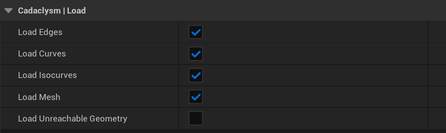
Document component before the file is opened.Or add a Cadaclysm component to an actor of your own: the actors forward loading and nothing else.
Loading at run time
Load CAD File blocks until the document is drawable. That is right at a loading screen and wrong anywhere else: a large assembly takes seconds, and no frame happens during them. Load CAD File Async returns at once, does the work on a worker, and reports its progress through OnLoadProgress — the phase (parsing, meshing, reading, building) and how far through it. The geometry appears as soon as it exists.
Document->OnLoadProgress.AddDynamic(this, &AMyActor::OnProgress);
Document->LoadFileAsync(Path, ECadaclysmConvention::Unreal);
// ... later, to give up on it:
Document->CancelLoad();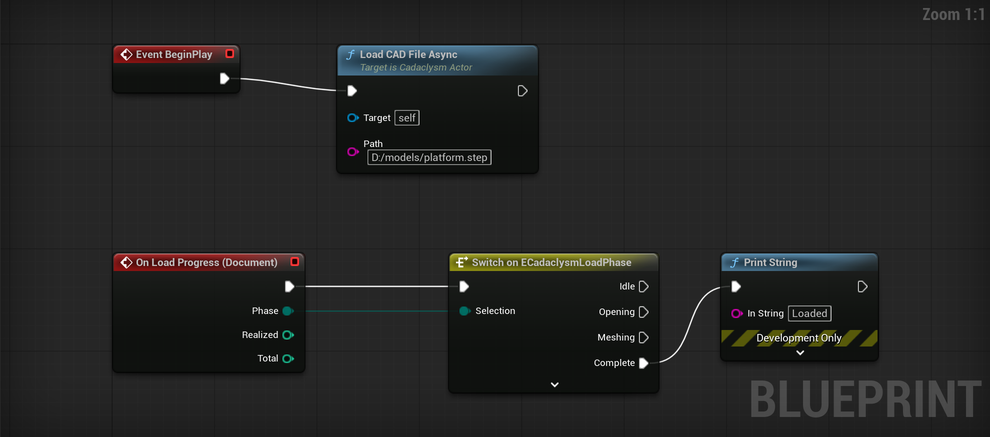
Document component, switching on the phase.A second call supersedes the first. IsLoading and GetLoadPhase answer where it is, and Get Load Diagnostics hands back what the reader and the mesher complained about — a face that would not trim, a body that could not be read — as a list you can show or log. A file that opens with diagnostics is normal; a file that opens with none is a good file.
The convention
CAD is Z up, right-handed, usually millimetres. Unreal is Z up, left-handed, centimetres. The Convention pin on the load node decides which space the document arrives in, and defaults to Unreal: the conversion is done as the geometry is built, triangle winding included, so nothing is mirrored by a negative scale on the actor and normals point out.
| Convention | Space |
|---|---|
Unreal | Z up, left-handed, centimetres. The default. |
Native | Exactly what the file says, in its own units. |
Unity, YUp, Blender | The other engines' spaces, for a project that shares code with them. |
Documents far from the origin
A site on its survey grid sits millions of units out, where a GPU's single-precision float is a quarter of a unit apart. The component keeps its triangles, surfaces and lines about a point near the document and puts that point back in double precision, so a building 2,600 km out draws exactly as it does at the origin — faces, edges and picking alike.
Shadows need virtual shadow maps that far out. Measured on a site 2,600 km from the world origin: Unreal's cascaded and ray-traced shadows drop out there for every mesh, its own static meshes included, while virtual shadow maps (r.Shadow.Virtual.Enable=1) keep them. A project that loads survey-grid files wants them on.
Usually nothing to set
STEP and IFC files name the EXPRESS schema they were written against, and every schema the library ships — the STEP application protocols, the IFC releases — is compiled in. A file opens with nothing configured and nothing staged beside the plugin.
Express Schema Paths is for a schema the library does not carry: a house schema, or a release newer than the plugin. Any entry may be a directory, walked to its depths with every .exp under it registered, so a project can point at the folder its schemas live in. They are read in sorted order, so where two files declare the same schema name the same one wins on every machine. A schema with the same name as a built-in replaces it.
Decided before the file is opened
These are read when the load starts, because they decide what is built and kept. Changing one afterwards does nothing until the file is opened again — the component builds its buffers and closes the file, which is what lets a very large assembly be drawn without also being held twice.
| Property | Default | What it decides |
|---|---|---|
| Load Mesh | on | Whether parts are meshed at all. Off, with the surface component, is a document with no triangles in it. |
| Load Edges, Load Curves, Load Isocurves | on | Which families of lines are built. A kind that was not built cannot be shown later. See edges and isocurves. |
| Generate Levels Of Detail | on | Simplified copies of each part, chosen by screen size while drawing. |
| Use Vertex Color Buffer | on | Four bytes a vertex so parts can be recoloured at run time. Off saves the memory and fixes the colours. |
| Generate Texture Coordinates | off | World-scale UVs, for a material that needs them. |
| Generate Collision, Hull Triangle Budget | off, 255 | One convex hull fitted per part, or several with Max Hulls Per Part. See collision. |
| Keep Document For Queries | on | Keeps the file's tree open — names, properties, the query language — after the geometry is built. The meshes are let go either way. |
| Load Unreachable Geometry | off | Bodies the file's own tree never places. Useful for inspecting a file, wrong for drawing one. |
The one exception to “read at load” among the heavy things is the distance field, which can be rebuilt in place at a new resolution because it is built from the buffers the component already holds. A collision fit cannot: it needs the document itself.
The tree
A document is a tree of nodes: assemblies, sub-assemblies and parts, with names, colours, placements and whatever properties the file carried. Get Num Nodes, Get Node, Get Root Nodes and Get Node Details walk it; Get Node Bounds and Get Node Transform place it. A part used a hundred times is read once and placed a hundred times, and is drawn that way too. The parts page is about working with them.