A GDExtension for Godot 4.4 and later. Put a STEP, IFC, Rhino, IGES, ACIS, OCCT .brep or OpenSCAD file in a project and it imports as a scene, the way a .glb does. Or open files while the game runs, walk the file's tree and draw its bodies and edges. The blacksmith kernel is there too: build exact solids in GDScript and write them to STEP.
Godot's own types
Nodes, meshes and scenes
The classes follow the Python module's object model, name for name: CadaclysmScene, CadaclysmNode, CadaclysmPlacement, and the kernel's CadaclysmSolid, CadaclysmProfile and CadaclysmFrame. Godot's own types stand in where Godot has one: a Transform3D for a placement, an AABB for bounds, a Color for paint and an ArrayMesh for triangles. One call, instantiate(), turns a whole file into MeshInstance3D nodes, and a body used many times shares one mesh.
Godot 4.4 or later. The standard build for Windows, macOS or Linux; the .NET build is not needed.
The addon. Each SDK release carries cadaclysm-<version>-godot.zip. Copy its addons/cadaclysm/ into your project's addons/. It holds the extension and the two cadaclysm libraries for Windows x64, macOS 11+ (universal) and Linux x64 and arm64: the same builds as the release's own archives.
Open the project. There is no plugin to enable: CAD files in the project import as scenes, and the Cadaclysm… classes are there in GDScript. Godot finds a new extension on its first scan of a project, so CAD files already in it import on the next launch. When you export a game, the .gdextension file copies the two libraries beside the executable.
The examples below are the scenes in the SDK's godot/project/examples/, beside the extension's source. To build it yourself, with Rust 1.94 or later: python fetch.py in the SDK, then python build.py --release --libs ../lib in godot/. Run an example with godot --path project res://examples/part/part.tscn -- part.step, and the tests headless with GODOT=path/to/godot python build.py --test.
Example · in the editor
A STEP file is a scene
Drop a CAD file into the FileSystem dock and Godot imports it through the extension: a scene with a MeshInstance3D for each body, in the file's colours, Y up and in metres. Instance it, inherit from it, or load it from code like any other scene. The Import dock's cadaclysm/ options add the edges, nest the bodies under the file's own tree, draw faces from both sides, or add world-scale UVs. The imported scene is plain Godot data, so an exported game draws it with no cadaclysm library at all.
var nut: Node3D = load("res://models/nut.step").instantiate()
add_child(nut)
Example · at run time
A part on its stand
Files the game only meets while it runs — a player's own model, a download — open with CadaclysmScene.open. It reads res:// and user:// paths too, in an exported game as well. instantiate_with({"edges": true}) builds the bodies and their edges. The edges use a small shader that pulls them towards the camera, so they stay on top of the faces they lie on. Drop another file on the window to open it.
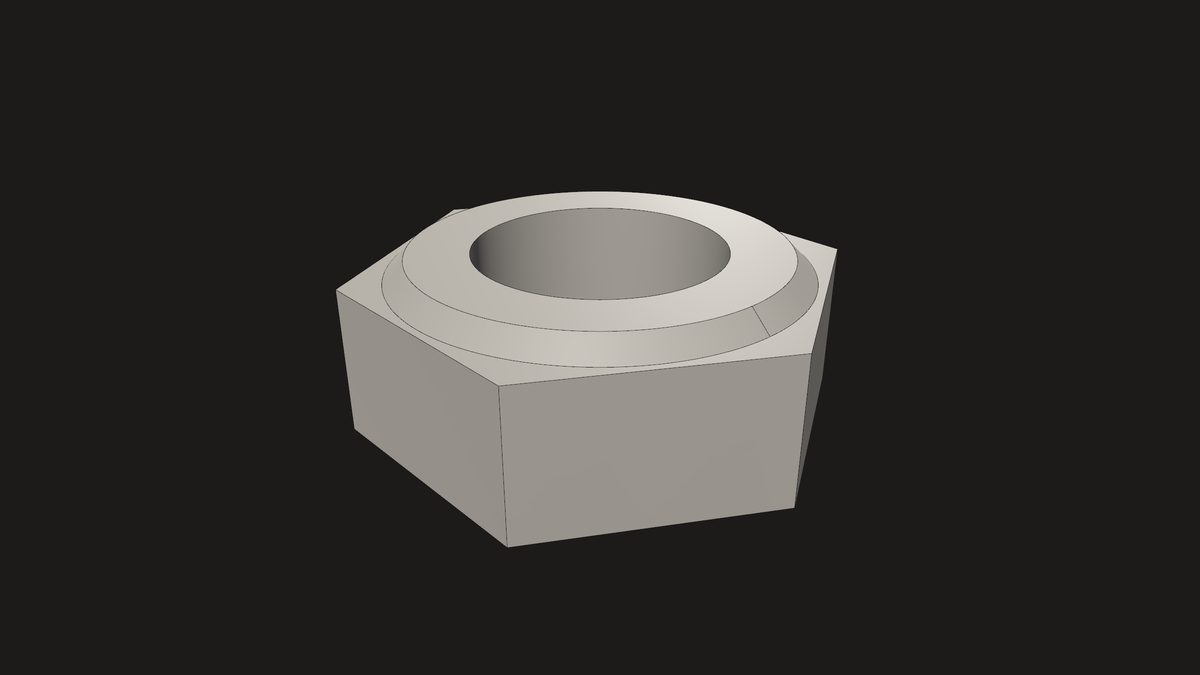
The logo's nut, as the part example draws it.
# A CAD part turning on its stand: `godot --path project res://examples/part/part.tscn# -- part.step`, or drop a STEP, IGES, IFC, SAT, 3DM or BREP file on the window.extends Node3D
var model: Node3D
func_ready() -> void:
var args := OS.get_cmdline_user_args()
open(args[0] if args.size() > 0else"res://examples/models/nut.step")
get_window().files_dropped.connect(func(files): open(files[0]))
funcopen(path: String) -> void:
var scene := CadaclysmScene.open(path) # metres, Y up: Godot's own spaceif scene == null:
push_error(Cadaclysm.last_error())
returnif model:
model.queue_free()
model = scene.instantiate_with({"edges": true}) # a MeshInstance3D per bodyadd_child(model)
$Camera.frame(scene.bounds)
scene.close() # the meshes are Godot's now
Example · 2D
A drawing sheet
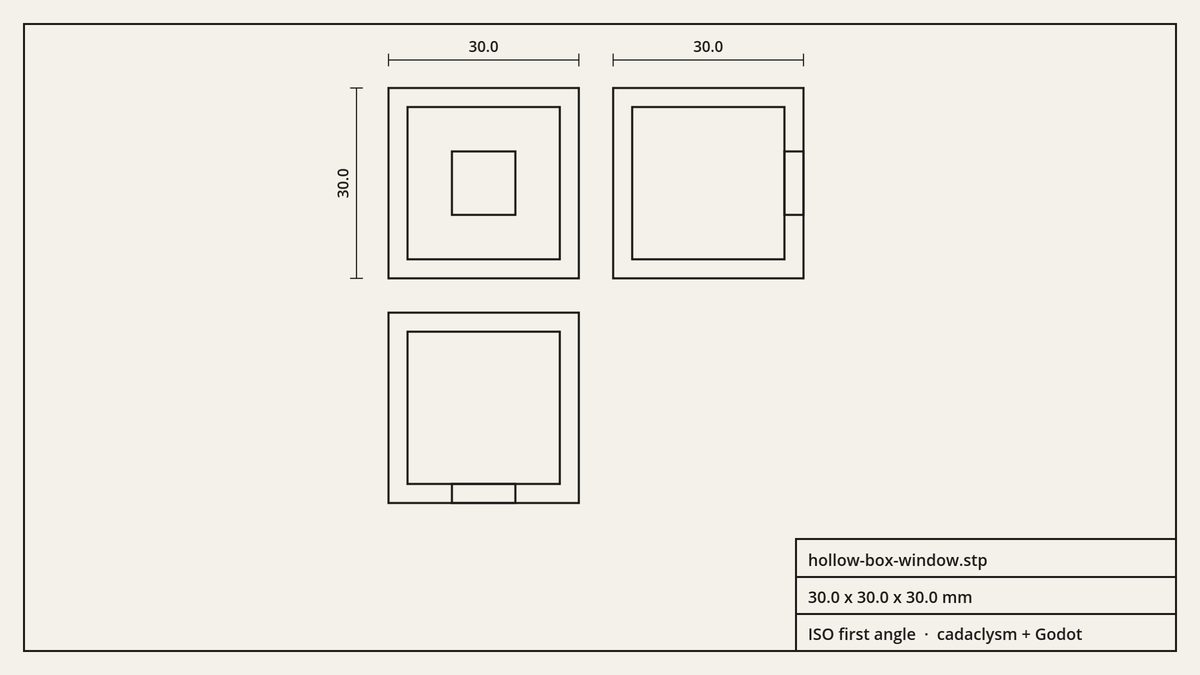
Every edge of the model seen from the front, from above and from the left, hidden ones included. The views are laid out in ISO first angle, with the overall sizes in millimetres and a title block. drawing() flattens the edges of the whole file into one array of point pairs, and one draw_multiline call draws each view.
A hollow box with a window, from the Examples page, as the drawing example lays it out.
# A drawing sheet from a CAD file: three views (ISO first angle), the overall sizes in# millimetres and a title block. `godot --path project res://examples/drawing/drawing.tscn# -- part.step`, or drop a file on the window.extends Control
const INK := Color(0.11, 0.105, 0.10)
const PAPER := Color(0.955, 0.945, 0.915)
var sheet := {}
func_ready() -> void:
var args := OS.get_cmdline_user_args()
open(args[0] if args.size() > 0else"res://examples/models/nut.step")
get_window().files_dropped.connect(func(files): open(files[0]))
resized.connect(queue_redraw)
funcopen(path: String) -> void:
var scene := CadaclysmScene.open(path) # metres, Y upif scene == null:
push_error(Cadaclysm.last_error())
return
sheet = {
"name": path.get_file(),
"size": scene.bounds.size, # metres"front": scene.drawing("front"), # every edge, seen from the front"top": scene.drawing("top"),
"left": scene.drawing("left"),
}
scene.close()
queue_redraw()
func_draw() -> void:
var w := size.x
var h := size.y
draw_rect(Rect2(Vector2.ZERO, size), PAPER)
draw_rect(Rect2(24, 24, w - 48, h - 48), INK, false, 2.0) # the borderif sheet.is_empty() or sheet["front"]["segments"].is_empty():
returnvar f: Dictionary = sheet["front"]
var t: Dictionary = sheet["top"]
var l: Dictionary = sheet["left"]
var fw: float = f["hi"].x - f["lo"].x
var fh: float = f["hi"].y - f["lo"].y
var lw: float = l["hi"].x - l["lo"].x
var th: float = t["hi"].y - t["lo"].y
# One scale for all three views: the front view top left, the view from the left# to its right and the view from above below it -- ISO first angle.var gap := 0.18 * maxf(fw, fh)
var s := minf((w - 200) / (fw + gap + lw), (h - 260) / (fh + gap + th))
var x0 := 96 + (w - 200 - s * (fw + gap + lw)) / 2var y0 := 88.0view(f, Vector2(x0, y0), s)
view(l, Vector2(x0 + (fw + gap) * s, y0), s)
view(t, Vector2(x0, y0 + (fh + gap) * s), s)
var metres: Vector3 = sheet["size"]
dimension(Vector2(x0, y0 - 28), Vector2(x0 + fw * s, y0 - 28), metres.x) # widthdimension(Vector2(x0 - 32, y0), Vector2(x0 - 32, y0 + fh * s), metres.y) # heightvar lx := x0 + (fw + gap) * s
dimension(Vector2(lx, y0 - 28), Vector2(lx + lw * s, y0 - 28), metres.z) # depth# The title block.var font := get_theme_default_font()
var box := Rect2(w - 24 - 380, h - 24 - 112, 380, 112)
draw_rect(box, INK, false, 2.0)
draw_line(box.position + Vector2(0, 38), box.position + Vector2(box.size.x, 38), INK, 2.0)
draw_line(box.position + Vector2(0, 75), box.position + Vector2(box.size.x, 75), INK, 2.0)
draw_string(font, box.position + Vector2(12, 27), sheet["name"], HORIZONTAL_ALIGNMENT_LEFT, -1, 16, INK)
draw_string(font, box.position + Vector2(12, 64), "%.1f x %.1f x %.1f mm" % [metres.x * 1000, metres.y * 1000, metres.z * 1000], HORIZONTAL_ALIGNMENT_LEFT, -1, 16, INK)
draw_string(font, box.position + Vector2(12, 101), "ISO first angle · cadaclysm + Godot", HORIZONTAL_ALIGNMENT_LEFT, -1, 16, INK)
# One view's edges at `s` pixels per metre, its top left corner at `at`.funcview(d: Dictionary, at: Vector2, s: float) -> void:
draw_set_transform(at - d["lo"] * s, 0.0, Vector2(s, s))
draw_multiline(d["segments"], INK, 1.6 / s, true)
draw_set_transform(Vector2.ZERO)
# A dimension line with end ticks from `a` to `b`, its length in millimetres beside it.funcdimension(a: Vector2, b: Vector2, metres: float) -> void:
var vertical := a.x == b.x
var tick := Vector2(6, 0) if vertical elseVector2(0, 6)
draw_line(a, b, INK, 1.0, true)
draw_line(a - tick, a + tick, INK, 1.0, true)
draw_line(b - tick, b + tick, INK, 1.0, true)
var label := "%.1f" % (metres * 1000)
var font := get_theme_default_font()
var width := font.get_string_size(label, HORIZONTAL_ALIGNMENT_LEFT, -1, 15).x
if vertical:
# Read from the right, as a drawing's vertical dimensions are.draw_set_transform(Vector2(a.x - 8, (a.y + b.y + width) / 2), -PI / 2)
draw_string(font, Vector2.ZERO, label, HORIZONTAL_ALIGNMENT_LEFT, -1, 15, INK)
draw_set_transform(Vector2.ZERO)
else:
draw_string(font, Vector2((a.x + b.x - width) / 2, a.y - 8), label, HORIZONTAL_ALIGNMENT_LEFT, -1, 15, INK)
Example · the kernel
Build it in GDScript
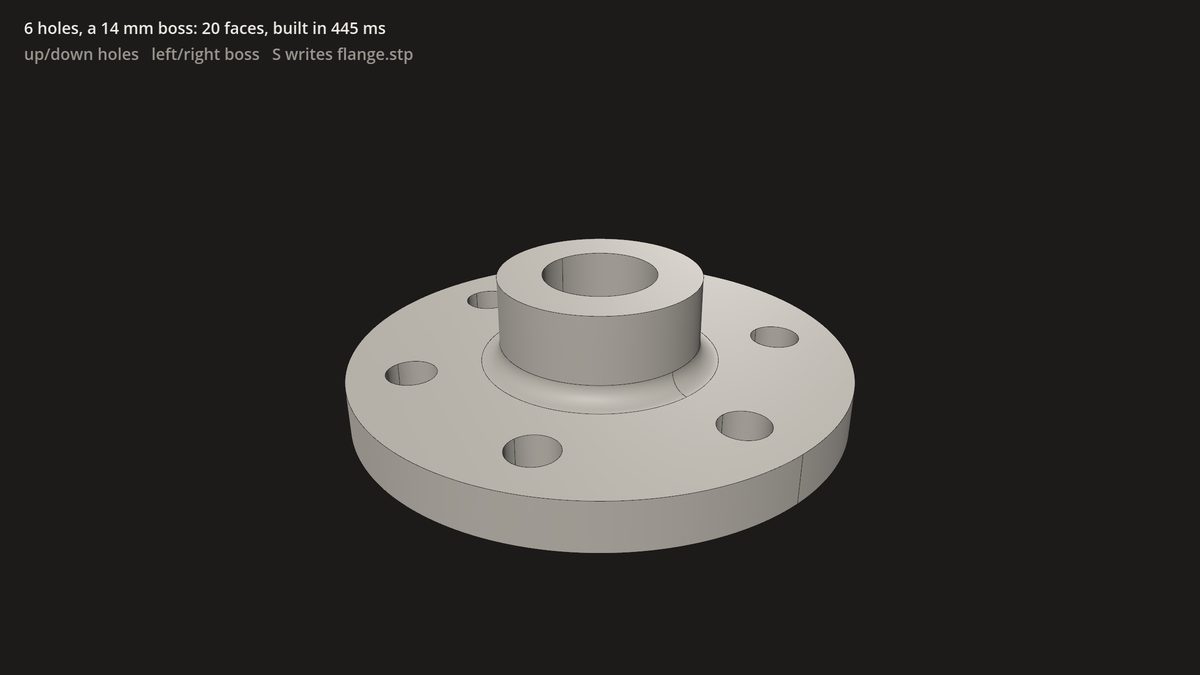
The blacksmith kernel in a game loop. A flange with a ring of bolt holes, a boss, a bore and a fillet where the boss meets the disc is rebuilt as an exact B-rep each time a key changes a parameter. S writes it to STEP. The kernel works in millimetres, so the part hangs under a node scaled to metres.
The forge example: the solid, its face count and how long the kernel took.
# A parametric flange, built by the blacksmith kernel while you watch:# `godot --path project res://examples/forge/forge.tscn`. Up and down change the bolt# holes, left and right the boss; S writes the exact solid to flange.stp.extends Node3D
var holes := 6# the two parameters; the kernel works in millimetresvar boss := 14var part: CadaclysmSolid
var bounds: AABB # of the upright part, in millimetresfuncflange() -> CadaclysmSolid:
# A disc with a ring of bolt holes: one outline, extruded once.var outline := CadaclysmProfile.circle(40)
for i in holes:
var a := TAU * i / holes
outline = outline.with_hole(CadaclysmProfile.circle(4).translate(30 * cos(a), 30 * sin(a)))
var disc := CadaclysmSolid.extrude(outline, CadaclysmFrame.xy(), 8)
# A boss on top, and a bore through both.var body := disc.join(CadaclysmSolid.cylinder(16, boss).translate(0, 0, 8)) \
.cut(CadaclysmSolid.cylinder(9, boss + 40).translate(0, 0, -20))
# Round the circle where the boss meets the disc: the one curved edge at z = 8, r = 16.var joint := []
for edge in body.edges:
var p: Vector3 = edge.segments[0]
ifnot edge.is_line andabsf(p.z - 8) < 1e-3andabsf(Vector2(p.x, p.y).length() - 16) < 1e-3:
joint.append(edge)
return body.fillet(joint, 3)
funcrebuild() -> void:
var started := Time.get_ticks_usec()
part = flange()
var took := (Time.get_ticks_usec() - started) / 1000.0var upright := part.rotate(Vector3.ZERO, Vector3.RIGHT, -PI / 2) # Z up to Y up
$Millimetres/Body.mesh = upright.array_mesh(0.02)
$Millimetres/Edges.mesh = upright.edge_mesh(0.02)
bounds = upright.bounds
$Hud/Title.text = "%d holes, a %d mm boss: %d faces, built in %.0f ms" % [holes, boss, part.faces, took]
func_ready() -> void:
rebuild()
$Camera.frame($Millimetres.transform * bounds) # the box in metres, as the scene isfunc_unhandled_key_input(event: InputEvent) -> void:
ifnot event.pressed:
returnmatch event.keycode:
KEY_UP: holes = mini(holes + 1, 16)
KEY_DOWN: holes = maxi(holes - 1, 3)
KEY_RIGHT: boss = mini(boss + 2, 40)
KEY_LEFT: boss = maxi(boss - 2, 4)
KEY_S:
part.step("flange.stp")
return
_: returnrebuild()
Example · the kernel
The mark, modelled
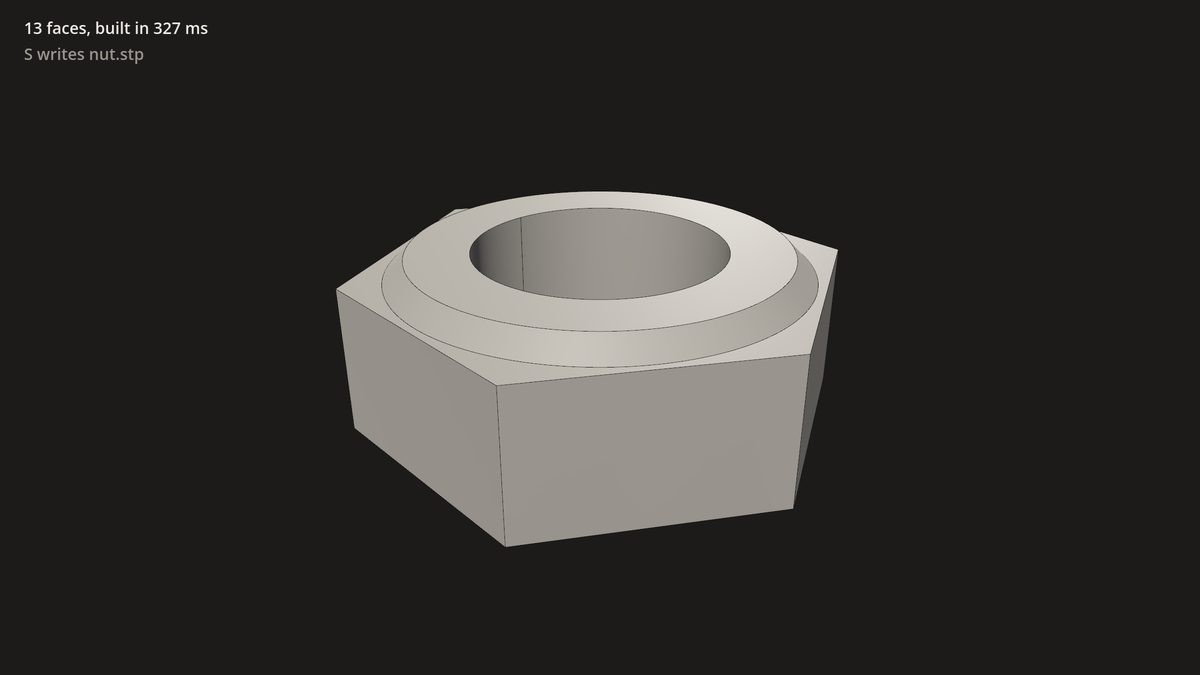
The nut in the Cadaclysm logo, as an exact solid: a hexagon extruded and bored, with a 45-degree chamfer at each end that leaves a narrow ledge at the corners. One profile, drawn the way a lathe would cut it and turned about the axis, meets the hexagon: what both keep is the nut, its ledges true planes and its chamfers true cones. Thirteen faces, and S writes it to STEP.
The nut example: the logo's nut, built by the kernel as the scene loads.
# The cadaclysm nut, built by the blacksmith kernel: `godot --path project# res://examples/nut/nut.tscn`. S writes the exact solid to nut.stp.extends Node3D
const R := 60.0# hexagon corner radius, mmconst BORE := 30.0# bore radiusconst THICK := 46.0# thicknessconst CONE := 50.0# where each chamfer cone meets its ledgeconst DEPTH := 5.0# the chamfer, 45 degreesvar solid: CadaclysmSolid
funcnut() -> CadaclysmSolid:
# The hexagon, a corner on +X, extruded up Z.var hexagon := CadaclysmProfile.regular_polygon(Vector2.ZERO, R, 6)
var hex := CadaclysmSolid.extrude(hexagon, CadaclysmFrame.xy(), THICK)
# What a lathe would leave: drawn as (radius, height) in the XZ plane and turned# about Z -- the bore inside, and at each end a 45-degree chamfer out to a ledge.var profile := CadaclysmProfile.polygon([
Vector2(BORE, 0), Vector2(CONE - DEPTH, 0), Vector2(CONE, DEPTH), Vector2(R + 10, DEPTH),
Vector2(R + 10, THICK - DEPTH), Vector2(CONE, THICK - DEPTH), Vector2(CONE - DEPTH, THICK),
Vector2(BORE, THICK)])
var turned := CadaclysmSolid.revolve_in_plane(profile, CadaclysmFrame.xz(), Vector2(0, 0), Vector2(0, 1), TAU)
# The nut is what both keep.return hex.common(turned)
func_ready() -> void:
var started := Time.get_ticks_usec()
solid = nut()
var took := (Time.get_ticks_usec() - started) / 1000.0var upright := solid.rotate(Vector3.ZERO, Vector3.RIGHT, -PI / 2) # Z up to Y up
$Millimetres/Body.mesh = upright.array_mesh(0.02)
$Millimetres/Edges.mesh = upright.edge_mesh(0.02)
$Camera.frame($Millimetres.transform * upright.bounds) # the box in metres
$Hud/Title.text = "%d faces, built in %.0f ms" % [solid.faces, took]
func_unhandled_key_input(event: InputEvent) -> void:
if event.pressed and event.keycode == KEY_S:
var written := solid.step("nut.stp")
$Hud/Keys.text = "wrote nut.stp"if written else Cadaclysm.last_error()
Notes
What to know
Errors. GDScript has no exceptions, so a call that fails returns null (or an empty value, or false), reports with push_error, and leaves the reason in Cadaclysm.last_error(), the way FileAccess.open works.
Godot's space by default.CadaclysmScene.open reads Y up, in metres, right-handed. open_with(path, {"convention": "native"}) keeps the file's own axes and units, and "unity", "unreal" and "blender" are there as in every other wrapper. Triangles are wound the way Godot wants.
Back to the file. Every MeshInstance3D that instantiate() builds carries a cadaclysm_node metadata entry, the index of the file node it stands for. The viewer example uses it to highlight a body when its row in the file's tree is picked.
Large files. A 5.8-million-triangle assembly of 2,813 bodies opens in 0.3 s, meshes in 8 s inside the library, becomes Godot nodes in 0.7 s, and turns at about 55 fps with its 853,000 edge segments on an RTX 3070. Import it in the editor and the mesh work is done once, not at every launch.
macOS. The libraries are not code-signed yet, so macOS quarantines an addon unzipped from a browser download and refuses to load it. Clear the flag once, in the project folder: xattr -dr com.apple.quarantine addons/cadaclysm.
Where it cannot run: web exports, which need a GDExtension built for the web, and 32-bit builds.
Licence. Everything works without one, and every open prints a notice. A game with no console can poll Cadaclysm.license_notice_count() and show its own. See the licence file and pricing.
Status
The Godot extension is the SDK's godot/ folder, a Rust GDExtension over the SDK's Rust crate and the same two libraries every wrapper uses. Tested with Godot 4.7 on Windows.