A Qt viewer
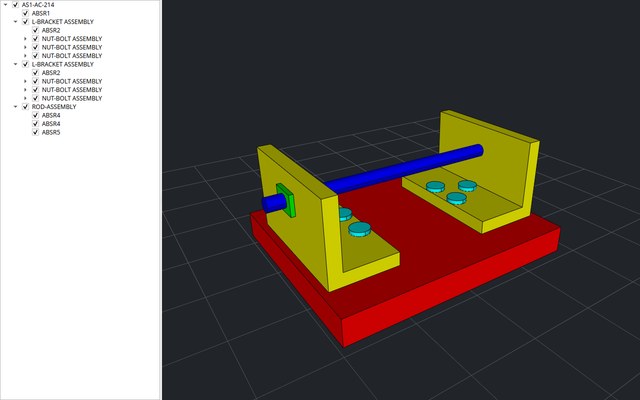
A desktop app in C++ with two panes. On the left, the file's node tree in Qt widgets: a tick shows or hides a part, and a selection highlights it. On the right, the file drawn by cadaclysm_view from its exact surfaces, with its edges: drag to orbit, drag with the right button to pan, scroll to zoom, and click a part to select it in the tree. The viewer owns the GPU, the frame and the camera. The app hands it a window and the mouse, which is why its whole viewport is 125 lines of C++ and a 43-line header (the Vulkan version this tutorial replaces needed 253 and 56). It runs on Direct3D 12 or Vulkan on Windows and on Vulkan on Linux, where it was tested; the same code is written for macOS, where the view draws with Metal.
What you need
- Qt 6.5 or later, with Qt Widgets, for C++.
- CMake 3.21 and a C++17 compiler.
- A cadaclysm release archive, unpacked (see Getting started). It holds
cadaclysm_capi, which reads the file (cadaclysm.h, the C API), andcadaclysm_view, which draws it (cadaclysm_view.h, its section of the C API). - A GPU with Direct3D 12, Vulkan or Metal.
- On Linux, the OpenGL development headers even though the app never draws with OpenGL: Qt's CMake package looks for them (
libgl-devon Ubuntu and Debian, which pulls inlibglx-devandlibopengl-dev). At run time, Qt 6'sxcbplatform plugin needslibxcb-cursor0.
The view loads nothing itself. It finds the cadaclysm_capi that the process has already loaded and reads the scene through it. The archive is a CMake prefix, and find_package(cadaclysm) gives the target cadaclysm::view, which brings the reader with it.
cadaclysm-<version>-<platform>/
├── include/        cadaclysm.h, cadaclysm_view.h
└── lib/            cadaclysm_capi and cadaclysm_view, and lib/cmake/cadaclysm/ (the CMake package)
qt_viewer/
├── CMakeLists.txt  the build
├── main.cpp        the window: the tree, the viewport, the wiring between them
├── viewport.h      the viewport's interface
└── viewport.cpp the window handle, the frames and the mouseThe build
CMakeLists.txt: Qt Widgets, the unpacked archive as a CMake prefix, the target cadaclysm::view, and on Windows a copy of both DLLs beside the executable, where the loader looks for them.
cmake_minimum_required(VERSION 3.21)
project(qt_viewer LANGUAGES CXX)

set(CMAKE_CXX_STANDARD 17)
set(CMAKE_AUTOMOC ON)

find_package(Qt6 REQUIRED COMPONENTS Widgets)
# An unpacked cadaclysm release archive is a CMake prefix: -DCMAKE_PREFIX_PATH=<its folder>.
find_package(cadaclysm CONFIG REQUIRED)
if(NOT TARGET cadaclysm::view)
  message(FATAL_ERROR "this cadaclysm folder has no cadaclysm_view library")
endif()

add_executable(qt_viewer main.cpp viewport.cpp viewport.h)
# The viewer, and through it the reader.
target_link_libraries(qt_viewer PRIVATE Qt6::Widgets cadaclysm::view)

# The two libraries beside the executable, where Windows looks for them.
if(WIN32)
  add_custom_command(TARGET qt_viewer POST_BUILD COMMAND ${CMAKE_COMMAND} -E copy_if_different
    $<TARGET_FILE:cadaclysm::reader> $<TARGET_FILE:cadaclysm::view> $<TARGET_FILE_DIR:qt_viewer>)
endif()The window
main.cpp opens the file named on the command line, or asks for one, builds the node tree, and puts the viewport in a QSplitter beside it. Each tree item keeps its node's index, which is also what the view's calls and picks take, so there is no mapping between the two. The window goes before the scene is closed.
#include <QApplication>
#include <QFileDialog>
#include <QMessageBox>
#include <QSplitter>
#include <QTreeWidget>

#include <vector>

#include "viewport.h"

// The node's tree item and its children's, recursively; `items[node]` finds it again.
static QTreeWidgetItem *addNode(CadaclysmScene *scene, uint32_t node, std::vector<QTreeWidgetItem *> &items) {
    QString label = QString::fromUtf8(cadaclysm_node_name(scene, node));
    if (label.isEmpty()) label = QString::fromUtf8(cadaclysm_node_kind(scene, node));
    if (label.isEmpty()) label = QStringLiteral("#%1").arg(node);
    QTreeWidgetItem *item = new QTreeWidgetItem({label});
    item->setData(0, Qt::UserRole, node);
    item->setCheckState(0, cadaclysm_node_visible(scene, node) ? Qt::Checked : Qt::Unchecked);
    items[node] = item;
    for (uint32_t i = 0; i < cadaclysm_node_child_count(scene, node); ++i)
        item->addChild(addNode(scene, cadaclysm_node_child(scene, node, i), items));
    return item;
}

int main(int argc, char **argv) {
    QApplication app(argc, argv);

    const QString path = argc > 1 ? QString::fromLocal8Bit(argv[1])
                                  : QFileDialog::getOpenFileName(nullptr, "Open a CAD file");
    if (path.isEmpty()) return 0;
    CadaclysmScene *scene = cadaclysm_open(path.toUtf8().constData(), nullptr);
    if (!scene) {
        QMessageBox::critical(nullptr, "qt_viewer", QString::fromUtf8(cadaclysm_last_error()));
        return 1;
    }

    int code;
    {
        // The viewport on the right.
        Viewport *viewport = new Viewport(scene);

        // The node tree on the left: a tick shows or hides a node, a selection highlights it.
        QTreeWidget *tree = new QTreeWidget;
        tree->setHeaderHidden(true);
        std::vector<QTreeWidgetItem *> items(cadaclysm_node_count(scene), nullptr);
        for (uint32_t i = 0; i < cadaclysm_root_count(scene); ++i)
            tree->addTopLevelItem(addNode(scene, cadaclysm_root(scene, i), items));
        tree->expandToDepth(1);

        QObject::connect(tree, &QTreeWidget::itemChanged, viewport, [viewport](QTreeWidgetItem *item) {
            viewport->showNode(item->data(0, Qt::UserRole).toUInt(), item->checkState(0) == Qt::Checked);
        });
        QObject::connect(tree, &QTreeWidget::currentItemChanged, viewport, [viewport](QTreeWidgetItem *item) {
            viewport->highlight(item ? item->data(0, Qt::UserRole).toUInt() : CADACLYSM_NONE);
        });
        // A click in the viewport selects the node it hit, in the tree.
        QObject::connect(viewport, &Viewport::picked, tree, [tree, &items](uint32_t node) {
            QTreeWidgetItem *item = node < items.size() ? items[node] : nullptr;
            tree->setCurrentItem(item);
            if (item) tree->scrollToItem(item);
        });

        QSplitter window;
        window.addWidget(tree);
        window.addWidget(viewport);
        window.setStretchFactor(1, 1);
        window.setSizes({320, 960});
        window.resize(1280, 800);
        window.setWindowTitle(QStringLiteral("%1 - qt_viewer").arg(path));
        window.show();
        code = app.exec();
    }  // the window, and with it the viewport and its view, go before the scene
    cadaclysm_close(scene);
    return code;
}The viewport's interface
viewport.h: a QWidget with its own native window, which Qt never paints (paintEngine() returns null). The view is made once the widget has its window.
#pragma once

#include <QPoint>
#include <QWidget>

#include <cadaclysm.h>
#include <cadaclysm_view.h>

// The right-hand pane: a native child window that the view draws into. The view owns the
// device, the frame and the camera; this widget hands it the window and the mouse.
class Viewport : public QWidget {
    Q_OBJECT
public:
    explicit Viewport(CadaclysmScene *scene, QWidget *parent = nullptr);
    ~Viewport() override;
    QPaintEngine *paintEngine() const override { return nullptr; }  // the view paints, not Qt

public slots:
    void showNode(uint32_t node, bool visible);
    void highlight(uint32_t node);

signals:
    void picked(uint32_t node);  // CADACLYSM_NONE: nothing under the cursor

protected:
    void showEvent(QShowEvent *event) override;
    void paintEvent(QPaintEvent *event) override;
    void resizeEvent(QResizeEvent *event) override;
    void mousePressEvent(QMouseEvent *event) override;
    void mouseMoveEvent(QMouseEvent *event) override;
    void mouseReleaseEvent(QMouseEvent *event) override;
    void wheelEvent(QWheelEvent *event) override;

private:
    QSize pixels() const { return size() * devicePixelRatio(); }  // the view counts physical pixels

    CadaclysmScene *scene;
    CadaclysmView *view = nullptr;  // made on the first paint, once the native window is at size
    QSize viewSize;                 // the size last given to the view, to resize it when it drifts
    uint32_t item = 0;              // the scene, as the view shows it
    uint32_t highlighted = CADACLYSM_NONE;
    QPoint pressed, last;
};The window handle, the frames and the mouse
viewport.cpp, the whole of it:
#include "viewport.h"

#include <QGuiApplication>
#include <QMouseEvent>
#include <QWheelEvent>

#if defined(Q_OS_WIN)
#include <windows.h>
#elif !defined(Q_OS_MACOS)
#include <QtGui/qguiapplication_platform.h>
#endif

// The widget's native window, as the view takes it.
static CadaclysmViewWindow nativeWindow(QWidget *widget, QSize pixels) {
    CadaclysmViewWindow window{};
    window.size = sizeof window;
    window.width = uint32_t(pixels.width());
    window.height = uint32_t(pixels.height());
#if defined(Q_OS_WIN)
    window.kind = CADACLYSM_VIEW_WINDOW_WIN32;
    window.window = reinterpret_cast<void *>(widget->winId());  // the HWND
    window.display = GetModuleHandleW(nullptr);                 // the HINSTANCE
#elif defined(Q_OS_MACOS)
    window.kind = CADACLYSM_VIEW_WINDOW_APPKIT;
    window.window = reinterpret_cast<void *>(widget->winId());  // the NSView
#else
    // X11. Under Wayland, run with QT_QPA_PLATFORM=xcb.
    QNativeInterface::QX11Application *x11 = qGuiApp->nativeInterface<QNativeInterface::QX11Application>();
    if (!x11) qFatal("qt_viewer needs X11 here: run it with QT_QPA_PLATFORM=xcb");
    window.kind = CADACLYSM_VIEW_WINDOW_XCB;
    window.window_id = widget->winId();  // the xcb_window_t
    window.display = x11->connection();
#endif
    return window;
}

Viewport::Viewport(CadaclysmScene *scene, QWidget *parent) : QWidget(parent), scene(scene) {
    // A native window of its own, which Qt never paints.
    setAttribute(Qt::WA_NativeWindow);
    setAttribute(Qt::WA_PaintOnScreen);
    setAttribute(Qt::WA_NoSystemBackground);
    setMinimumSize(320, 240);
}

// The view goes before its window.
Viewport::~Viewport() { cadaclysm_view_destroy(view); }

// showEvent fires before the native window is necessarily at its final, laid-out size (a
// splitter's geometry can lag a frame behind); creating the view here can bake in a size the
// window hasn't reached yet. The view is made on the first paint instead, once Qt has a real
// frame to draw and the native window is at the size the widget itself reports.
void Viewport::showEvent(QShowEvent *) { update(); }

// Frames are drawn on demand: after a change, and for as long as the view says one is owed
// (parts uploading, exact surfaces refining, a pick waiting for its answer).
void Viewport::paintEvent(QPaintEvent *) {
    if (!view) {
        const CadaclysmViewWindow window = nativeWindow(this, pixels());
        view = cadaclysm_view_create(&window, nullptr);  // exact surfaces, any GPU backend, Z up
        if (!view) qFatal("cadaclysm_view_create: %s", cadaclysm_view_last_error());
        item = cadaclysm_view_show(view, scene);
        if (!item) qWarning("cadaclysm_view_show: %s", cadaclysm_view_last_error());
        viewSize = pixels();
    } else if (pixels() != viewSize) {
        // A resize that resizeEvent missed or that raced ahead of the native window's own.
        cadaclysm_view_resize(view, uint32_t(pixels().width()), uint32_t(pixels().height()));
        viewSize = pixels();
    }
    if (!cadaclysm_view_draw(view)) qWarning("cadaclysm_view_draw: %s", cadaclysm_view_last_error());
    CadaclysmViewPick pick{};
    pick.size = sizeof pick;
    if (cadaclysm_view_pick_result(view, &pick)) emit picked(pick.item ? pick.node : CADACLYSM_NONE);
    if (cadaclysm_view_needs_draw(view)) update();
}

void Viewport::resizeEvent(QResizeEvent *) {
    if (!view) return;
    cadaclysm_view_resize(view, uint32_t(pixels().width()), uint32_t(pixels().height()));
    viewSize = pixels();
}

// ---- the mouse: left drag orbits, right or middle drag pans, the wheel zooms, a click picks

void Viewport::mousePressEvent(QMouseEvent *event) { pressed = last = event->position().toPoint(); }

void Viewport::mouseMoveEvent(QMouseEvent *event) {
    const QPoint at = event->position().toPoint();
    const QPointF d = QPointF(at - last) * devicePixelRatio();
    last = at;
    if (!view) return;
    if (event->buttons() & Qt::LeftButton) cadaclysm_view_orbit(view, float(d.x()), float(d.y()));
    else if (event->buttons() & (Qt::RightButton | Qt::MiddleButton)) cadaclysm_view_pan(view, float(d.x()), float(d.y()));
    else return;
    update();
}

void Viewport::mouseReleaseEvent(QMouseEvent *event) {
    // A click, not a drag: ask what is under the cursor. The answer comes on a later frame.
    if (!view || event->button() != Qt::LeftButton || (event->position().toPoint() - pressed).manhattanLength() > 3)
        return;
    const QPointF at = event->position() * devicePixelRatio();
    cadaclysm_view_request_pick(view, uint32_t(at.x()), uint32_t(at.y()));
    update();
}

void Viewport::wheelEvent(QWheelEvent *event) {
    if (!view) return;
    cadaclysm_view_zoom(view, event->angleDelta().y() / 120.0f);  // in notches
    update();
}

// ---- what the tree asks for: each call covers the node and everything under it

void Viewport::showNode(uint32_t node, bool visible) {
    if (view && cadaclysm_view_set_node_visible(view, item, node, visible)) update();
}

void Viewport::highlight(uint32_t node) {
    if (!view) return;
    if (highlighted != CADACLYSM_NONE) cadaclysm_view_set_node_highlight(view, item, highlighted, nullptr);
    highlighted = node;
    const float orange[4] = {1.0f, 0.55f, 0.1f, 0.6f};  // alpha: how strongly it tints
    if (node != CADACLYSM_NONE) cadaclysm_view_set_node_highlight(view, item, node, orange);
    update();
}
The window handle. nativeWindow hands the view the HWND on Windows, the NSView on macOS, or the X11 window and its XCB connection on Linux; under a Wayland session, run the app with QT_QPA_PLATFORM=xcb.
Frames are on demand. paintEvent draws, answers a pick if one landed, and asks for another frame while cadaclysm_view_needs_draw says one is still owed (parts uploading, exact surfaces refining, a pick in flight). The view itself is also made on that first paintEvent rather than in showEvent: on Windows the native window's real client size can still lag Qt's own layout when showEvent fires (a splitter reported 955×800 while the HWND was still 320×480), and a swapchain made at the wrong size fails under the Vulkan validation layer. paintEvent also re-syncs the size if a resize was missed.
Sizes and pick coordinates are physical pixels, hence devicePixelRatio; the camera takes pixels dragged and wheel notches, and node calls cover the node's whole subtree.
Build it and run it
cmake -S qt_viewer -B build "-DCMAKE_PREFIX_PATH=<Qt>/6.10.3/msvc2022_64;<path>/cadaclysm-<version>-windows-x64"
cmake --build build --config Release
build/Release/qt_viewer.exe part.step
On Linux and macOS, drop --config Release and run build/qt_viewer instead:
cmake -S qt_viewer -B build -DCMAKE_PREFIX_PATH="<Qt>/6.10.3/gcc_64;<path>/cadaclysm-<version>-linux-x64"     # Linux
cmake -S qt_viewer -B build -DCMAKE_PREFIX_PATH="<Qt>/6.10.3/macos;<path>/cadaclysm-<version>-macos-universal"     # macOS
cmake --build build
build/qt_viewer part.step
Qt's own libraries must be found too: put Qt's bin/ on PATH, or run windeployqt on the executable. The file can be STEP, IGES, SAT, 3dm, IFC, BREP or anything else the reader opens. The tree fills, then the parts appear on the right as they upload, coloured as the file colours them and grey where it gives no colour, with their edges drawn. Drag with the left button to orbit, drag with the right or middle button to pan, and use the wheel to zoom. Click a part to select it in the tree. Untick a node to hide it and everything under it.
Choosing a backend, before the view is created:
export CADACLYSM_WGPU_BACKEND=vulkan     # Linux
$env:CADACLYSM_WGPU_BACKEND = "vulkan"    # PowerShell, or "dx12"
or from code, with CadaclysmViewOptions.backend.
Unlicensed, everything works and cadaclysm_capi prints a notice on every file opened. cadaclysm_license_set("cadaclysm.lic") before the open, or a cadaclysm.lic beside the executable, removes it.
Change it
Each change is a line on the view. A layer on or off (surfaces, edges, curves, isocurves):
cadaclysm_view_set_layer(view, CADACLYSM_VIEW_LAYER_ISOCURVES, true);Triangles instead of exact surfaces, and asking which is drawn:
cadaclysm_view_set_surfaces(view, CADACLYSM_VIEW_SURFACES_TRIANGLES);
cadaclysm_view_surfaces(view);
A node's own colour, over the file's (nullptr clears it):
const float blue[4] = {0.2f, 0.5f, 0.9f, 1.0f};
cadaclysm_view_set_node_color(view, item, node, blue);
A standard view, then framing the camera on everything shown:
cadaclysm_view_standard(view, CADACLYSM_VIEW_STANDARD_ISO);
cadaclysm_view_frame(view, 0);
More files in one view: cadaclysm_view_show once per open scene, each with its own item, and cadaclysm_view_remove to drop one.
Where next
The view's section of the C API is the reference: every call, its errors, and the size-field rule its structs share. The C API page covers the reader: nodes, attributes, placements and the rest of what the tree could show.
← A web viewer in ten lines · A SwiftUI viewer → · All languages