LÖVE — aka Love2D — and its 3D and VR sibling LÖVR both run on LuaJIT, whose FFI calls a C library directly. The SDK's LuaJIT wrapper is plain Lua over the same two libraries every other wrapper uses: nothing to compile, no plugin to build. Open a STEP, IFC, Rhino, IGES, ACIS, OCCT .brep or OpenSCAD file, walk its tree and draw its meshes and edges; or build exact solids in Lua with the blacksmith kernel and write them to STEP.
One module for each engine
The same Lua in both
cadaclysm.lua reads files and cadaclysm_blacksmith.lua is the kernel; both are the Python module's object model, name for name, and run unchanged in LÖVE, LÖVR or a plain luajit. Two small helpers, cadaclysm_love.lua and cadaclysm_lovr.lua, turn meshes and edges into each engine's own meshes, copying the library's arrays through the FFI with no Lua table in between — a five-million-triangle assembly goes up in under a second.
An engine.LÖVE 11.5 or LÖVR 0.19, the 64-bit build for Windows, macOS or Linux. Any LuaJIT with its FFI will do, so a plain luajit runs the same code outside an engine.
The SDK and its libraries. The SDK repository holds the wrapper in luajit/; fetch.py downloads the two libraries for your machine into lib/:
git clone https://github.com/rdeioris/cadaclysm-sdk
cd cadaclysm-sdk
python fetch.py
Into your game. Copy the wrapper's files beside main.lua, and the libraries from lib/ beside them (.dll on Windows, lib….so on Linux, lib….dylib on macOS). The kernel's two files and library are needed only if you build solids.
mygame/
  main.lua  conf.lua
  cadaclysm.lua  cadaclysm_cdef.lua                       -- reading files
  cadaclysm_blacksmith.lua  cadaclysm_blacksmith_cdef.lua -- the kernel
  cadaclysm_love.lua                                      -- or cadaclysm_lovr.lua
  cadaclysm_capi.dll  cadaclysm_blacksmith.dll
Require it.local cadaclysm = require("cadaclysm"). The library is found beside the Lua files, beside a fused game's executable, or where CADACLYSM_LIBRARY (CADACLYSM_BLACKSMITH_LIBRARY for the kernel) points; cadaclysm.load(path) names it outright — for a library your game unpacks to its save directory, say.
The examples below are in the SDK's luajit/examples/: from luajit/, love examples/love-part part.step or lovr examples/lovr-part part.step. The tests run headless in either engine: lovec test, lovr test.
Example · LÖVE
A part on its stand
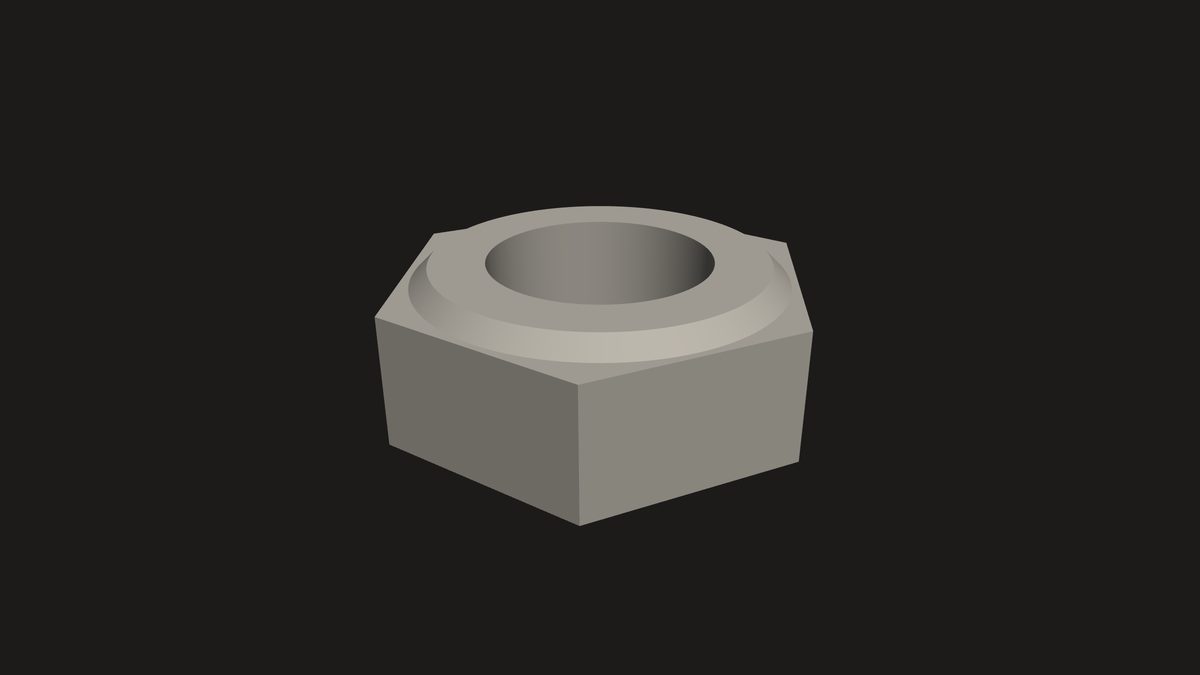
Open a file, take each placement — every drawing of every body, so a part used twice is drawn twice — and hand its triangles to LÖVE once. The file's own colours come with it. Drop another file on the window to open it.
The logo's nut, as love-part draws it.
-- A CAD part turning on its stand, in LÖVE: `love love-part part.step`,-- or drop a STEP, IGES, SAT, 3DM, BREP or IFC file on the window.-- The wrapper sits two folders up here; in your own game, keep its files beside-- main.lua and leave this line out.
package.path = love.filesystem.getSource() .. "/../../?.lua;" .. package.path
local cadaclysm = require("cadaclysm")
local CL = require("cadaclysm_love")
local parts, view, angle = {}, nil, 0.6localfunctionopen(path)
local scene = cadaclysm.open(path, nil, "y-up") -- metres, Y up
parts = {}
for _, placement inipairs(scene.placements) do-- every drawing of every bodylocal body = placement.geometry
parts[#parts + 1] = {
mesh = CL.mesh(body.mesh), -- the triangles, copied once
place = placement.raw_transform, -- where this copy sits
colour = body.colour or { 0.72, 0.70, 0.66 }, -- the file's own paint
}
end
view = CL.frame(scene.bounds)
scene:close() -- the LÖVE meshes are ours nowendfunction love.load(args) open(args[1] or"part.step") endfunction love.filedropped(file) open(file:getFilename()) endfunction love.update(dt) angle = angle + dt * 0.4endfunction love.draw()
love.graphics.clear(0.11, 0.105, 0.10)
CL.begin3d(view, angle)
for _, part inipairs(parts) do CL.draw(part.mesh, part.place, part.colour) end
CL.end3d()
end
Example · LÖVE
A drawing sheet
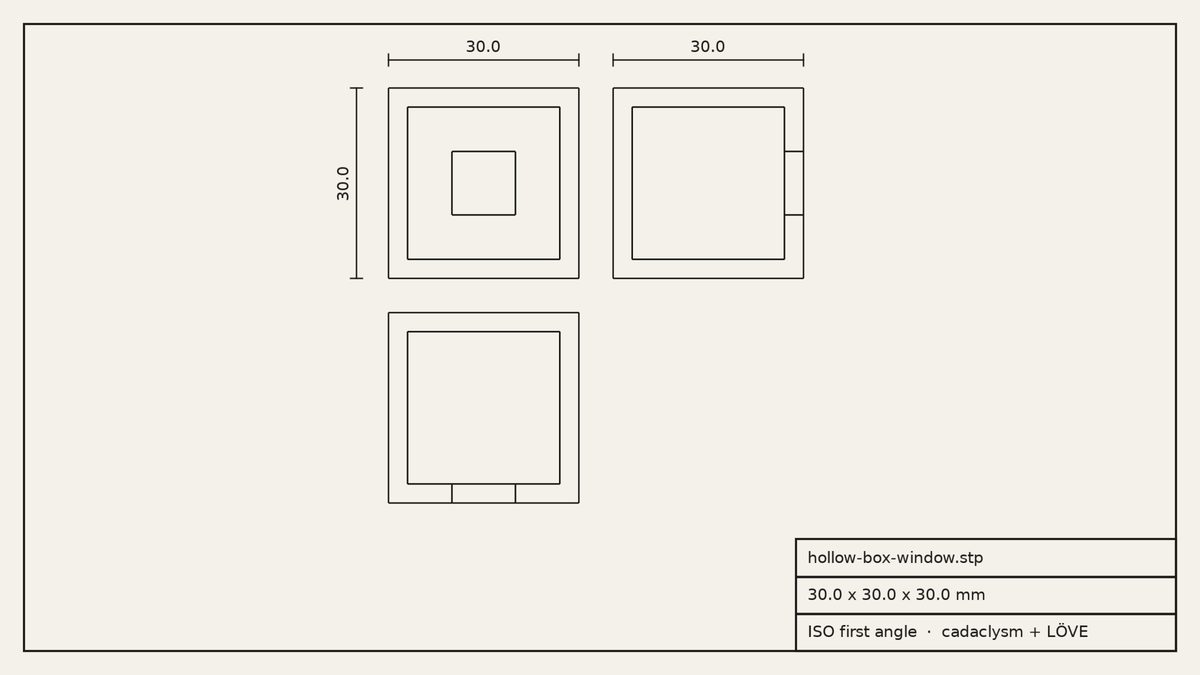
LÖVE is at home in 2D. Every edge of the model, seen from the front, from above and from the left — hidden ones included — laid out in ISO first angle, with the overall sizes in millimetres and a title block. The edges of a whole assembly become one mesh that a small shader widens to a constant line width, so a sheet of a million segments still draws in one call.
A hollow box with a window, from the Examples page, as love-drawing lays it out.
-- A drawing sheet from a CAD file, in LÖVE: three views (ISO first angle), the-- overall sizes in millimetres and a title block. `love love-drawing part.step`,-- or drop a file on the window.-- The wrapper sits two folders up here; in your own game, keep its files beside-- main.lua and leave this line out.
package.path = love.filesystem.getSource() .. "/../../?.lua;" .. package.path
local cadaclysm = require("cadaclysm")
local CL = require("cadaclysm_love")
local INK, PAPER = { 0.11, 0.105, 0.10 }, { 0.955, 0.945, 0.915 }
local sheet
localfunctionopen(path)
local scene = cadaclysm.open(path, nil, "y-up") -- metres, Y up
sheet = {
name = path:gsub("\\", "/"):match("[^/]*$"),
size = scene.bounds.size, -- {x, y, z} in metres
front = CL.drawing(scene, "front"), -- every edge, seen from the front
top = CL.drawing(scene, "top"),
left = CL.drawing(scene, "left"),
}
scene:close()
endfunction love.load(args)
love.graphics.setFont(love.graphics.newFont(15))
open(args[1] or"part.step")
endfunction love.filedropped(file) open(file:getFilename()) endlocalfunctionwidth(d) return d.hi[1] - d.lo[1] endlocalfunctionheight(d) return d.hi[2] - d.lo[2] end-- A dimension: a line with end ticks from (x1, y1) to (x2, y2), its text beside it.localfunctiondimension(x1, y1, x2, y2, metres)
local vertical = x1 == x2
local tx, ty = vertical and6or0, vertical and0or6
love.graphics.line(x1, y1, x2, y2)
love.graphics.line(x1 - tx, y1 - ty, x1 + tx, y1 + ty)
love.graphics.line(x2 - tx, y2 - ty, x2 + tx, y2 + ty)
local label = ("%.1f"):format(metres * 1000)
local font = love.graphics.getFont()
local w, h = font:getWidth(label), font:getHeight()
if vertical then
love.graphics.print(label, x1 - h - 4, (y1 + y2 + w) / 2, -math.pi / 2) -- read from the rightelse
love.graphics.print(label, (x1 + x2 - w) / 2, y1 - h - 4)
endendfunction love.draw()
local W, H = love.graphics.getDimensions()
love.graphics.clear(PAPER)
love.graphics.setColor(INK)
love.graphics.setLineWidth(2)
love.graphics.rectangle("line", 24, 24, W - 48, H - 48) -- the borderlocal f, t, l = sheet.front, sheet.top, sheet.left
ifnot f.mesh thenreturnend-- One scale for all three views, the front view top left, the view from the left-- to its right and the view from above below it: ISO first angle.local gap = 0.18 * math.max(width(f), height(f))
local s = math.min((W - 200) / (width(f) + gap + width(l)), (H - 260) / (height(f) + gap + height(t)))
local x0 = 96 + (W - 200 - s * (width(f) + gap + width(l))) / 2local y0 = 88local fx, fy = x0 - f.lo[1] * s, y0 - f.lo[2] * s
CL.draw_lines(f, fx, fy, s, 1.6)
CL.draw_lines(l, x0 + (width(f) + gap) * s - l.lo[1] * s, fy, s, 1.6)
CL.draw_lines(t, fx, y0 + (height(f) + gap) * s - t.lo[2] * s, s, 1.6)
love.graphics.setLineWidth(1)
dimension(x0, y0 - 28, x0 + width(f) * s, y0 - 28, sheet.size[1]) -- widthdimension(x0 - 32, y0, x0 - 32, y0 + height(f) * s, sheet.size[2]) -- heightlocal lx = x0 + (width(f) + gap) * s
dimension(lx, y0 - 28, lx + width(l) * s, y0 - 28, sheet.size[3]) -- depth-- The title block.local bw, bh = 380, 112local bx, by = W - 24 - bw, H - 24 - bh
love.graphics.setLineWidth(2)
love.graphics.rectangle("line", bx, by, bw, bh)
love.graphics.line(bx, by + 38, bx + bw, by + 38)
love.graphics.line(bx, by + 75, bx + bw, by + 75)
love.graphics.print(sheet.name, bx + 12, by + 10)
love.graphics.print(("%.1f x %.1f x %.1f mm"):format(sheet.size[1] * 1000, sheet.size[2] * 1000,
sheet.size[3] * 1000), bx + 12, by + 47)
love.graphics.print("ISO first angle · cadaclysm + LÖVE", bx + 12, by + 84)
end
Example · LÖVE and the kernel
Build it in Lua
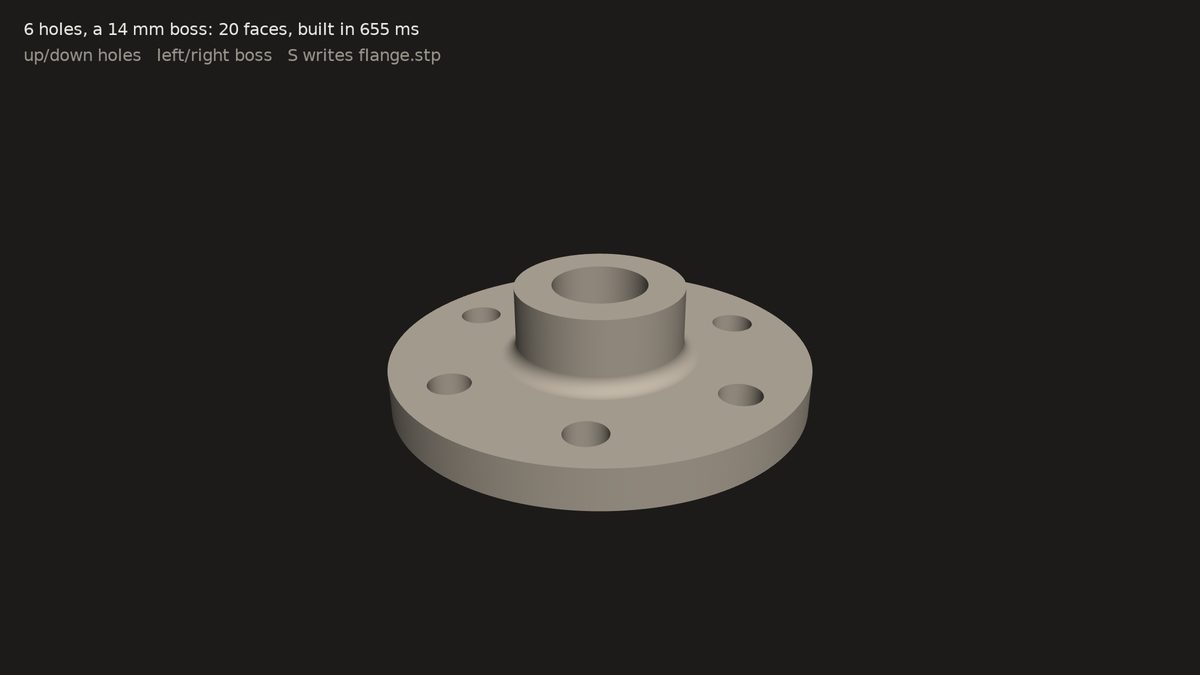
The blacksmith kernel in a game loop: a flange with a ring of bolt holes, a boss, a bore and a fillet where the boss meets the disc, rebuilt as an exact B-rep each time a key changes a parameter — and written to STEP when you ask.
love-forge: the solid, its face count and how long the kernel took.
-- A parametric flange, built by the blacksmith kernel while you watch, in LÖVE:-- `love love-forge`. Up and down change the bolt holes, left and right the boss;-- S writes the exact solid to flange.stp.-- The wrapper sits two folders up here; in your own game, keep its files beside-- main.lua and leave this line out.
package.path = love.filesystem.getSource() .. "/../../?.lua;" .. package.path
local bs = require("cadaclysm_blacksmith")
local CL = require("cadaclysm_love")
local Profile, Solid, Frame = bs.Profile, bs.Solid, bs.Frame
local holes, boss = 6, 14-- the two parameters, in millimetreslocal part, mesh, view, took, angle
localfunctionflange()
-- A disc with a ring of bolt holes: one outline, extruded once.local outline = Profile.circle(40)
for i = 0, holes - 1dolocal a = 2 * math.pi * i / holes
outline = outline:with_hole(Profile.circle(4):translate(30 * math.cos(a), 30 * math.sin(a)))
endlocal disc = Solid.extrude(outline, Frame.xy(), 8)
-- A boss on top, and a bore through both.local body = disc:join(Solid.cylinder(16, boss):translate(0, 0, 8))
:cut(Solid.cylinder(9, boss + 40):translate(0, 0, -20))
-- Round the circle where the boss meets the disc: the one curved edge at z = 8, r = 16.local joint = {}
for _, edge inipairs(body.edges) dolocal p = edge.segments[1][1]
ifnot edge.is_line and math.abs(p[3] - 8) < 1e-6and math.abs(math.sqrt(p[1] ^ 2 + p[2] ^ 2) - 16) < 1e-6then
joint[#joint + 1] = edge
endendreturn body:fillet(joint, 3)
endlocalfunctionrebuild()
local start = love.timer.getTime()
if part then part:close() end
part = flange()
took = love.timer.getTime() - start
local upright = part:rotate({ { 0, 0, 0 }, { 1, 0, 0 } }, -math.pi / 2) -- Z up to Y up
mesh = CL.solid(upright, 0.02)
view = view or CL.frame(upright.bounds)
upright:close()
endfunction love.load()
love.graphics.setFont(love.graphics.newFont(16))
angle = 0.6rebuild()
endfunction love.update(dt) angle = angle + dt * 0.4endfunction love.keypressed(key)
if key == "up"then holes = math.min(holes + 1, 16)
elseif key == "down"then holes = math.max(holes - 1, 3)
elseif key == "right"then boss = math.min(boss + 2, 40)
elseif key == "left"then boss = math.max(boss - 2, 4)
elseif key == "s"then part:step("flange.stp") returnelsereturnendrebuild()
endfunction love.draw()
love.graphics.clear(0.11, 0.105, 0.10)
CL.begin3d(view, angle)
CL.draw(mesh, nil, { 0.74, 0.70, 0.64 })
CL.end3d()
love.graphics.setColor(0.94, 0.93, 0.91)
love.graphics.print(("%d holes, a %d mm boss: %d faces, built in %.0f ms"):format(holes, boss, part.faces,
took * 1000), 24, 20)
love.graphics.setColor(0.6, 0.59, 0.56)
love.graphics.print("up/down holes left/right boss S writes flange.stp", 24, 46)
end
Example · LÖVR
On the table, in a headset
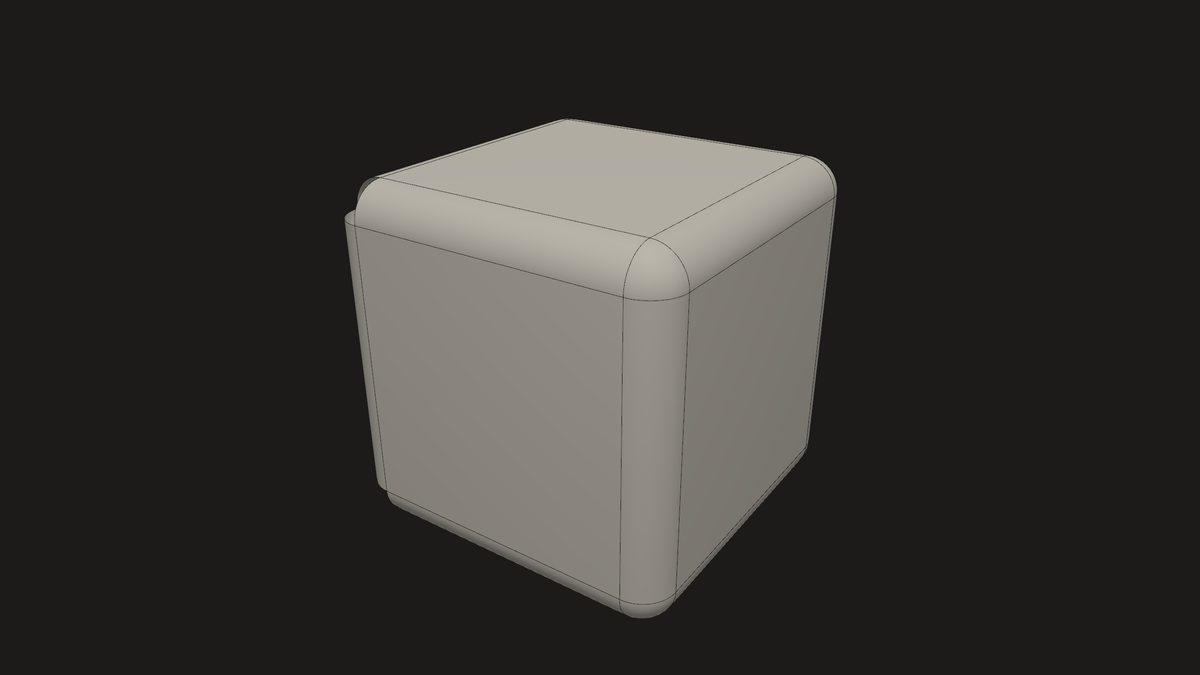
LÖVR draws lines natively, so the edges go over as the library hands them out and are depth-tested with the faces. In a headset — or LÖVR's desktop simulator — the part stands on a table in front of you, forty centimetres across; with the headset module off, the window orbits it.
A box with every edge filleted, from the Examples page, as lovr-part draws it.
-- A CAD part with its edges, in LÖVR: `lovr lovr-part part.step`. In a headset (or-- LÖVR's desktop simulator) it stands on a table in front of you; with the headset-- module off in conf.lua, the window orbits it.-- The wrapper sits two folders up here; in your own project, keep its files beside-- main.lua and leave this line out.
package.path = lovr.filesystem.getSource() .. "/../../?.lua;" .. package.path
local cadaclysm = require("cadaclysm")
local CL = require("cadaclysm_lovr")
local parts, view, table_top, angle = {}, nil, nil, 0.6function lovr.load(args)
local scene = cadaclysm.open(args[1] or"part.step", nil, "y-up") -- metres, Y upfor _, placement inipairs(scene.placements) dolocal body = placement.geometry
parts[#parts + 1] = {
mesh = CL.mesh(body.mesh), -- the faces
edges = CL.edges(body.edges), -- the edges, as LÖVR lines
place = lovr.math.newMat4(unpack(placement.raw_transform)),
colour = body.colour or { 0.72, 0.70, 0.66 },
}
end
view, table_top = CL.frame(scene.bounds), CL.table_top(scene.bounds)
scene:close()
lovr.graphics.setBackgroundColor(0.11, 0.105, 0.10)
endfunction lovr.update(dt) angle = angle + dt * 0.4endfunction lovr.draw(pass)
if lovr.headset then pass:transform(table_top) else CL.camera(pass, view, angle) end
pass:setShader(CL.shader())
pass:setDepthOffset(-2, -2) -- faces a hair back, so the edges on them showfor _, part inipairs(parts) do
pass:setColor(part.colour)
pass:draw(part.mesh, part.place)
end
pass:setShader()
pass:setDepthOffset(0, 0)
pass:setColor(0.07, 0.07, 0.08)
for _, part inipairs(parts) doif part.edges then pass:draw(part.edges, part.place) endendend
Notes
What to know
Fields, not calls. What Python spells as a property is a field (node.name, scene.placements, solid.faces); what Python calls is a method (scene:query(filter), solid:fillet(edges, 2)). The LuaJIT reference lists every one.
Borrowed memory. A mesh's arrays point into the document itself; nothing is copied until a helper copies it to the GPU. Views keep their document alive, and scene:close() or solid:close() frees it at once.
Indices count from zero where the library counts them (nodes, faces, edges, mesh indices); the Lua arrays the wrapper builds count from one.
Threads. A love.thread is its own Lua state and requires the module itself; meshing a large file there keeps the game loop running.
Where it cannot run: love.js (it has no FFI) and 32-bit builds. A fused game cannot load a library from inside its archive: ship the libraries beside the executable.
Licence. Everything works without one, and every open prints a notice to stderr; a game with no console can poll cadaclysm.license_notice_count() and show its own. See the licence file and pricing.
Status
The LuaJIT wrapper is the SDK's luajit/ folder, beside the Python, C#, Go, Java, Node.js, Rust and Swift wrappers, over the same two libraries. Tested with LÖVE 11.5 and LÖVR 0.19.